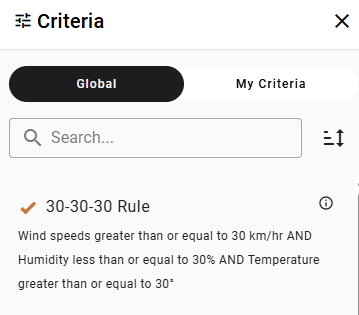
Apply Saved Criteria
Open the Criteria panel in the upper right and select from the list of Saved Criteria to update the assets shown in the table and map. Search or Sort for the desired criteria.
Use the upper menu to toggle between Global (organization) and My Criteria (user-defined).
Create New Criteria
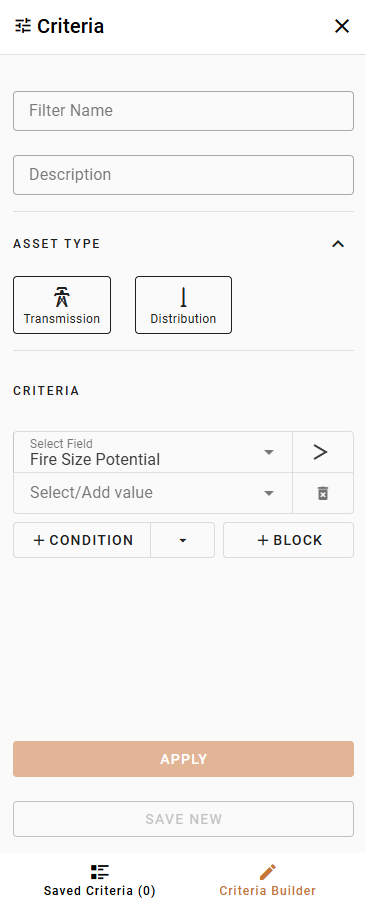
Alternatively, select Criteria Builder from the bottom menu to design a new criteria.
Depending on the user permissions assigned to you by your organization, your options may be more limited than those shown here.

-
Complete the fields in the Criteria Builder to enter your Filter Name, Description, Operating Company, and Asset Type.
-
Set the thresholds for your metrics and values. Use the +Condition button to add a new threshold line, and use the And/Or dropdown to apply the appropriate logic to your criteria. Use the +Block button to add a block of multiple conditions. The Criteria Builder allows for advanced query logic through this and/or functionality.
-
Click Apply to view the results of this criteria or Clear Selection to start over.
-
Save your criteria:
-
For users without permissions to create global criteria click Save if creating a new user criteria. If editing an existing global criteria, an error will appear stating that global filters cannot be overridden. Click Save Copy to create a new version of the existing criteria. If editing an existing user criteria, click Save and then select Save Changes or Save New User Criteria from the dropdown.
-
For users with permissions to create global criteria, click Save As if creating a new criteria. Then, select Save New User Criteria or Save New Global Criteria from the dropdown. If editing an existing criteria, click Save and then select Save Changes, Save New User Criteria, or Save New Global Criteria from the dropdown.
-
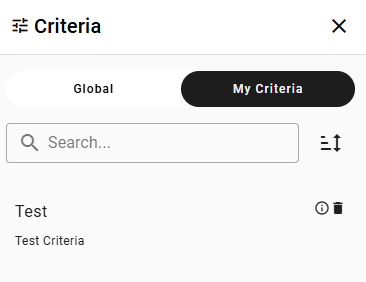
View the name and description of your new criteria on the My Criteria menu. Use the Trash Can icon to delete the criteria or click the i button to view the parameters of the criteria.