
Advanced settings allow for additional customization of layers in the Map Layers panel.
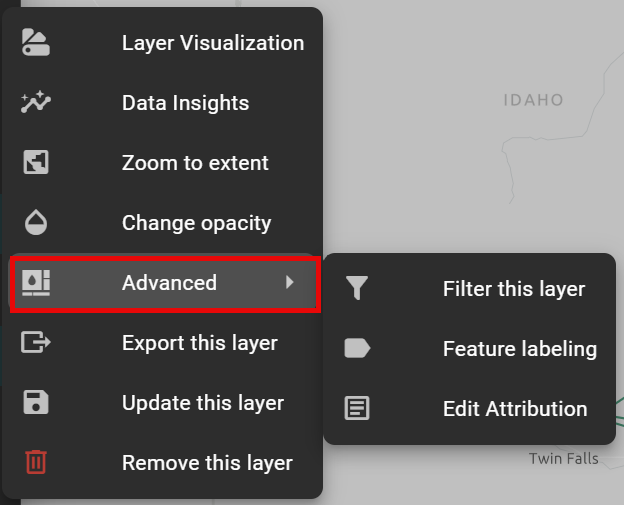
Filter this Layer
This panel lets users filter which features from the layer are displayed on the map based on attribute values.
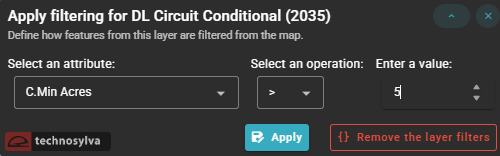
It works as a simple conditional rule builder with three components:
-
Select an attribute — The data field to filter on
-
Select an operation — The comparison operator
-
Enter a value — The threshold to filter against
Apply runs the filter, while Remove the layer filters clears any active filtering and restores the full dataset.
Feature Labeling
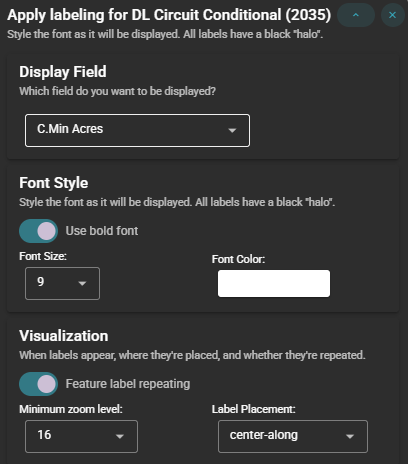
This panel controls how labels are displayed on the map for features in this layer, with three sections:
Display Field selects which attribute value is shown as the label on the map.
Font Style controls the visual appearance of the label text:
-
Bold Font
-
Font Size
-
Font Color
Visualization Controls label placement behavior on the map:
-
Feature label repeating – if toggled on, the label will repeat along extended features (useful for long line features)
-
Minimum zoom level – useful for keeping the map uncluttered at broad views while still surfacing detailed attribute information when users zoom into specific areas of interest.
-
Label Placement
Note: You may have to zoom to full extent to view labels.
Layer Attribution Editor