
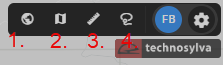
The map tools are located in the top right-hand corner of the application.
1. Zoom
Use the Zoom tool to view your organization’s full asset extent on the Map Canvas. When zoomed in, this tool quickly zooms out to the full extent.
2. Sync
Use the Sync feature to link the map view with the data panel. Zooming into the map refines the attribute table to display circuits in view.
3. Measure
After selecting the Measure tool:
-
Single click on the map to start measuring and continue clicking to draw a shape.
-
Double right click to close the polygon.
4. Lasso
After selecting the Lasso tool:
-
Click once and draw around the area of interest.
-
Double-click to complete the loop and query the assets. This will load a pop-up window showing a list of all the circuit details within the lasso.