
A variety of Map Layers are available to help you maintain situational awareness and enhance suppression efforts. Map Layers can be accessed from the Incident Map or the Main Map by tapping the Layers icon in header of the Incident Map or Main Map.
There are two tabs on the Map Layers screen: Local and Web
Use the icon to adjust the opacity of the layer.
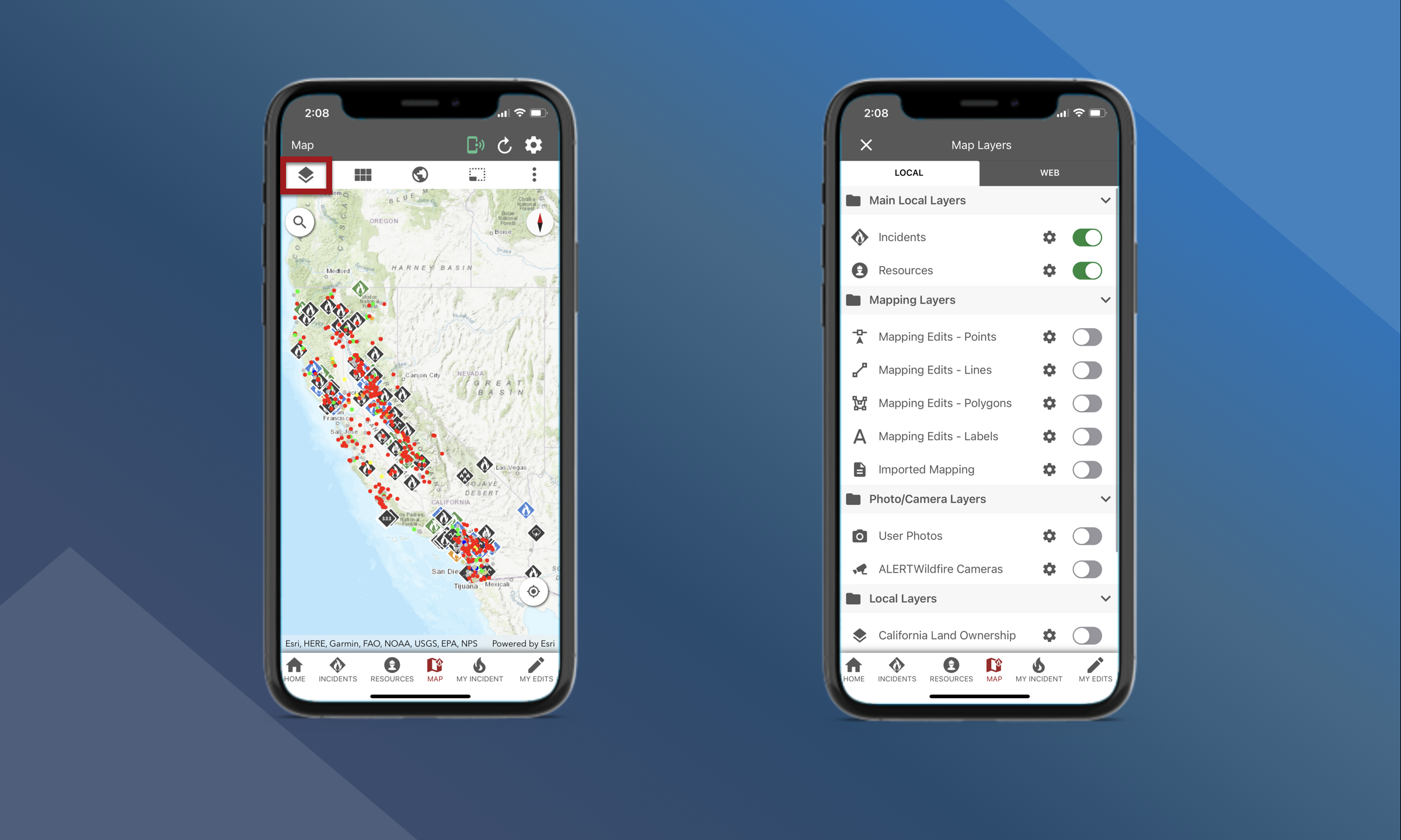
Local
Map Layers that are available in the Local tab are included when you download and install the app. You can toggle On or Off Map Layers for:
-
Incidents
-
Resources
-
Mapping Layers for features created or imported in Tactical Analyst
-
Photos/Camera Layers
-
Geodatabase Layers like Regions or Counties
The data displayed in these Map Layers may be “old” if you are in an area of poor connectivity and you have not been able to sync the app recently.
Web
Map Layers that are available in the Web tab come from several web sources. Your mobile device must have cellular or Wi-Fi connectivity to use these layers. You can toggle On or Off Map Layers for:
-
Historic fire data
-
Mapping data
-
Fuels
-
Fire Detections
-
Weather
Some mapping layers will require you to enter Service Credentials to access the layer.