
After logging in, you will see the main interface.
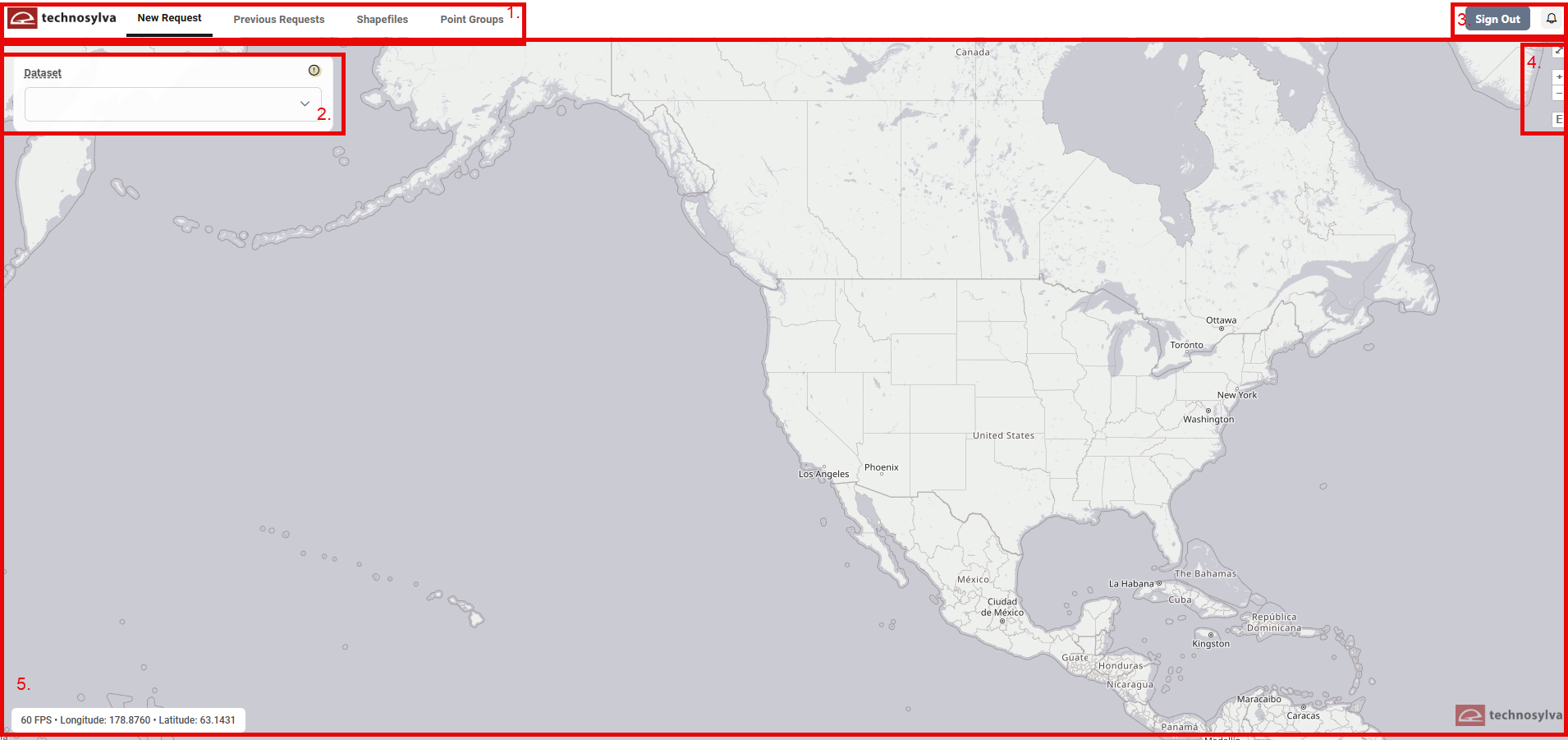
1. Main Toolbar
The navigation bar at the top has four tabs:
-
New Request: the main query form.
-
Previous Requests: history of submitted queries and their results.
-
Shapefiles: manage saved shapefile regions organized by dataset.
-
Point Groups: manage saved point location sets.
2. Side Panel
Visible only if the New Request or Point Group tab is selected. Controlled the content visible on the Map Canvas.
3. Upper Right Toolbar
The Sign Out and Notifications (bell) icons are visible across all tabs.
A number appears over the Notifications icon if notifications are available.
4. Map Controls
Map Controls are visible whenever the Map Canvas is shown:
-
Diagonal arrow: Expand the Map Canvas. Press the x to collapse.
-
+: Zoom In
-
-: Zoom Out
-
E: Returns to default extent
5. Map Canvas
Visible when the New Request, Shapefiles, or Point Group tab is selected.
The bottom left corner displays frames per second (FPS) and coordinates of the map cursor.